
10 KiB
Splitter
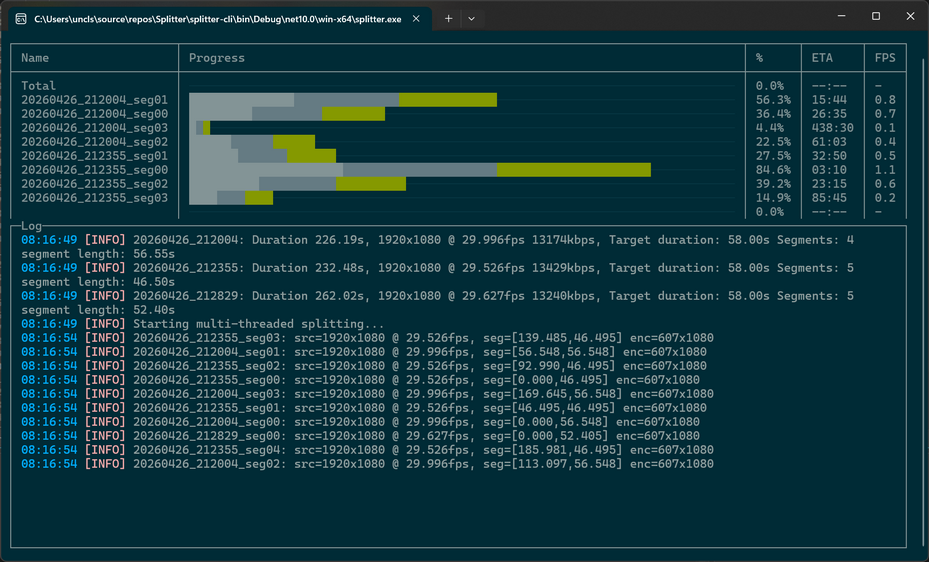
Splitter is a high-performance command line tool for cutting one or more video files into equal or fixed-length segments using multi-threaded FFmpeg execution. It supports batch input, flexible duration formats, rotation, smart face/body-aware cropping, ETA and speed reporting, and both rich and plain-text terminal output.
Features
- Multi-threaded FFmpeg splitting for maximum throughput
- Equal or fixed-length segmentation
- Batch input via file masks or list files
- Smart cropping with face/body tracking
- Rotation correction
- ETA, speed, and progress display
- FFmpeg passthrough for advanced control
- [Potentially] Cross-platform (.NET 10)
Requirements
- FFmpeg and FFprobe available in system PATH
- .NET 10 Runtime or newer
If you want to update model:
- For face detection: opencv_zoo/models/face_detection_yunet at main · opencv/opencv_zoo
- For body detection: yolov8s.pt · Ultralytics/YOLOv8 at main
To convert models from PyTorch to ONNX, you can use the following command:
from ultralytics import YOLO

model = YOLO("yolov8x.pt")
model.export(format="onnx", opset=12, half=False)   # FP32 ONNX
How It Works
- Reads total duration using ffprobe
- Parses target duration
- Computes number of segments
- If not forced, equalizes segment lengths
- Runs multiple FFmpeg processes in parallel
- Applies rotation, crop, and tracking if enabled
- Displays progress, ETA, and speed
Face Tracking vs Body Tracking
Face tracking and body tracking serve different purposes, and Splitter supports both because each excels in different recording environments. When converting horizontal footage into vertical clips, the choice of detector determines how stable, reliable, and natural the automated camera motion will be.
Face Tracking Using UltraFace 320
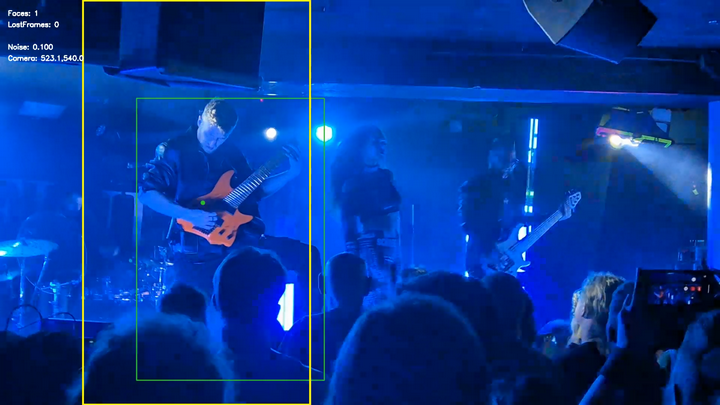
Splitter uses the UltraFace 320 ONNX model to perform lightweight, real-time face detection on each frame of the input video. The detector produces bounding boxes for visible faces, and the tracking system maintains a stable, smoothed target region across time. This is achieved by combining per-frame detections with temporal smoothing (EMA), dropout tolerance, and camera easing. The result is a continuous, stable crop window that follows the performer even when the face is partially occluded, briefly lost, or moving rapidly.
During segmentation, the crop window is recalculated for every frame, ensuring that each output segment inherits the same smooth camera motion. This makes the vertical clips appear as if they were recorded with a dedicated portrait-oriented camera operator. The UltraFace 320 model is fast enough to run alongside multi-threaded FFmpeg splitting without becoming a bottleneck, making it suitable for long recordings and batch processing.
Benefits of Full-Body Detection Using YOLOv8s for Live Gig Recordings
When recording concerts or live gigs, performers often move unpredictably, turn away from the camera, or become partially obscured by lighting, instruments, or stage effects. Full-body detection using a YOLOv8s ONNX model provides a more reliable tracking anchor than face detection alone. Because YOLOv8s can detect the entire human silhouette, the tracker maintains stable framing even when the face is not visible, when the performer is far from the camera, or when stage lighting makes facial features hard to detect. This produces vertical clips that feel intentional and professionally framed, with fewer sudden jumps or lost-tracking moments. For creators converting horizontal gig footage into short vertical clips for YouTube Shorts or TikTok, body-based tracking significantly improves consistency, reduces manual editing, and preserves the energy and motion of the performance.
Automated Camera Control
Splitter includes an automated camera control system that simulates the behavior of a virtual camera operator when generating vertical crops from horizontal footage. The goal is to maintain smooth, intentional framing around the tracked subject, even when detections are noisy, intermittent, or temporarily lost.
The controller receives object detections (face or body) and converts them into a stable crop window using a combination of Kalman filtering, exponential smoothing, dropout tolerance, and a three-state tracking model. The Kalman filter provides predictive motion smoothing, while the EMA factor blends the predicted position with the previous camera center to avoid jitter. The camera easing value controls how quickly the virtual camera follows the subject, producing natural-looking motion rather than abrupt jumps.
When detections disappear, the controller enters one of two fallback modes. In LostFreeze mode, the camera holds its last known position for a configurable number of frames, preventing sudden jumps during brief occlusions. If the subject remains lost beyond that threshold, the controller transitions to LostDrift mode, slowly drifting the camera back toward a neutral center position. This prevents the crop from drifting off-screen and ensures that the output remains usable even when tracking fails. All positions are clamped to valid bounds, guaranteeing that the crop window never leaves the video frame.
Automatic rotation detection
The rotation-estimation method is based on analyzing the distribution of gradient orientations within a video frame. After converting the frame to grayscale, the algorithm computes horizontal and vertical image gradients using Sobel operators and derives per-pixel gradient magnitudes and orientations. These orientations are folded into the range [0, 180) and accumulated into a fixed-size, magnitude-weighted histogram. The histogram represents the structural edge distribution of the frame, independent of brightness fluctuations or local lighting artifacts. By comparing the total gradient energy concentrated near 0 degrees (vertical edges) with the energy near 90 degrees (horizontal edges), the method determines whether the frame is more consistent with an upright or sideways orientation.
This approach is designed for environments where brightness-based cues are unreliable, such as live concerts with strobe lights, LED walls, haze, and crowd movement. It relies solely on geometric edge structure, which remains stable even under extreme lighting variation. The implementation is optimized for high-throughput video processing: all intermediate Mats, buffers, and histograms are preallocated, and pixel data is accessed directly through pointers to avoid per-frame memory allocation. The method is intentionally biased toward the upright orientation, returning a sideways classification only when the horizontal-edge energy significantly exceeds the vertical-edge energy.
Usage
splitter [<input.mp4> ...] [options] [--] <ffmpeg passthrough>
Inputs may be provided directly, via --file=..., or using file masks such as videos/*.mp4.
Options
Below is a clean, ASCII-only options table version of your content. All option names are preserved exactly, and descriptions are consolidated for clarity.
Options
| Option | Description |
|---|---|
| --out= | Output folder for generated segments. Default: <input folder>/Splitter. |
| --file= | Input file list or file mask. If omitted, the first non-option argument is used as input. Examples: --file=videos/*.mp4, --file=file_list.txt. |
| --mask= | Custom output filename pattern. Default: [NAME]_seg[NN].[EXT]. Supports [NAME], [N], [NN], [NNN], [NNNN], [EXT]. Example: --mask="[NAME]_[NNNN].mp4". |
| --duration= | Override target segment duration. Formats: Ns, NmMs, N. Examples: --duration=90s, --duration=2m30s, --duration=45. Without --force: max 58 seconds, equalized across segments. |
| --force | Use the duration exactly as provided. Last segment may be shorter. |
| --enhance | Enable video enhancement. Increases output resolution x4 using RealBasicVSR_x4 model. |
| --rotate= | Rotate video by 90, 180, or 270 degrees. Useful for correcting orientation metadata. |
| --rotate-auto | Use automatic rotation detection. |
| --estimate | Print calculated segment information and exit. No splitting is performed. |
| --crop[=<w:h>] | Crop video to a target width and height with face/body tracking. Default: 607x1080. Ideal for Shorts, TikTok, Reels. |
| --detect= | Object detector for tracking. Values: face (UltraFace), body (YoloOnnx, default), none (center crop). |
| --gravitate=<x:y> | Bias the crop window toward a normalized point in the frame. Example: --gravitate=0.2:0.5. |
| --text | Use plain-text logging instead of the rich terminal UI. |
| --single-thread | Disable parallel FFmpeg execution. Useful for debugging or low-resource systems. |
| --debug | Show debug overlay during tracking. No cropping performed, but crop region shown. |
| -p:= | Set custom parameters for the object detector. Example: -p:confidence=0.5. Defaults: DropoutToleranceFrames=20, EmaFactor=0.65, CameraEasing=0.03, LostFreezeFrames=60. |
FFmpeg Passthrough
Anything after -- is passed directly to FFmpeg.
Example:
splitter video.mp4 --force --duration=45 -- -an -sn
Input and Output Behavior
input.mp4may be a file mask (videos/*.mp4)- Output filenames follow the
--maskpattern - Output folder defaults to
<input folder>/Splitterunless overridden
Examples
Split into equal 60-second segments:
splitter vertical-video.mp4
Split into equal 90-second segments:
splitter vertical-video.mp4 --duration=90s
Custom naming:
splitter vertical-video.mp4 --duration=2m30s --mask="[NAME]_[NNNN].mp4"
Estimate only:
splitter vertical-video.mp4 --estimate
Fixed 45-second segments with passthrough:
splitter vertical-video.mp4 --force --duration=45 -- -an -sn
Smart crop for Shorts:
splitter horizontal-video.mp4 --out=Cropped/ --crop
Batch processing with body tracking:
splitter --file=file_names.txt --out=Cropped/ --crop --detect=body