
Splitter
This application was built to help me with maintaining my YouTube channel - UnclShura.
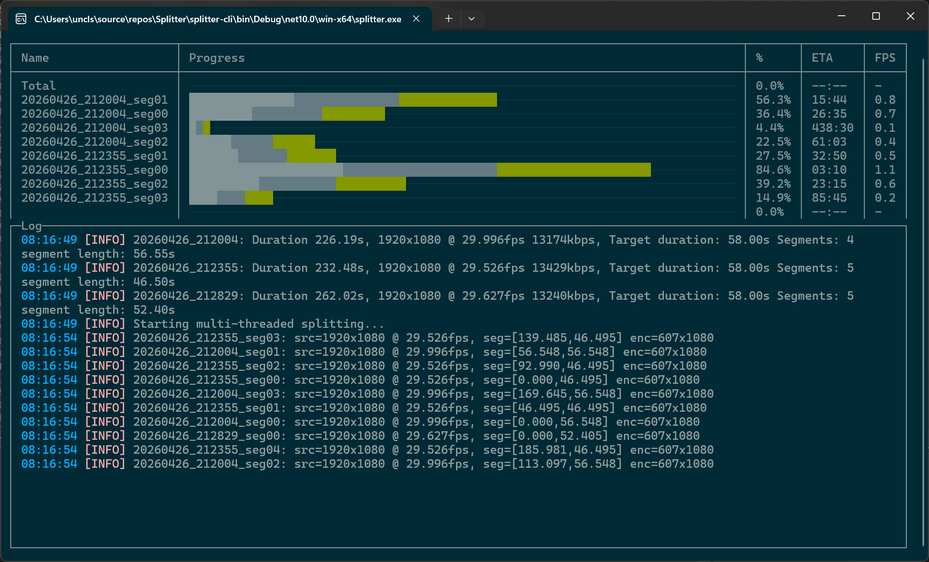
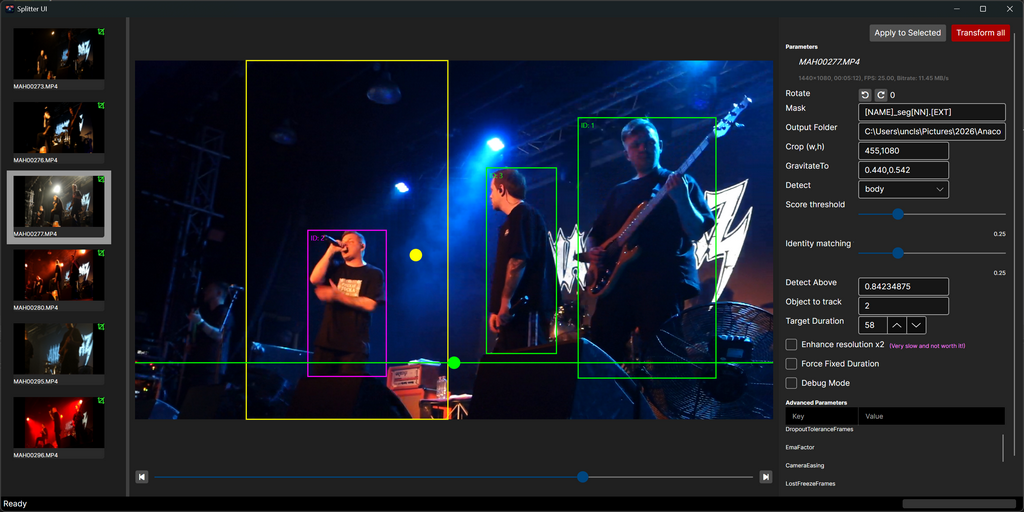
Splitter is a high-performance command line tool for cutting one or more video files into equal or fixed‑length segments using multi‑threaded FFmpeg execution. It supports batch input, flexible duration formats, rotation, smart face/body‑aware cropping, ETA and speed reporting, with nice GUI or both rich and plain-text terminal output.
The intended primary use case is for content creators who need to split large video files into smaller segments for platforms like TikTok, Instagram Reels, YouTube Shorts, or similar. The smart cropping feature allows the tool to automatically detect and keep faces or bodies in the frame when splitting, ensuring that important content is not cut off.
Splitter uses cutting-edge body-detection CV models to analyze the video and determine optimal cropping regions for each segment. Smooth tracking and gravitation bias ensure that the cropping remains stable and focused on the subject without excessive jitter or erratic movements. The tool can also correct for rotation metadata to ensure proper orientation in the output segments.
Splitter uses FFmpeg for the actual splitting and encoding, with multi-threading to maximize performance.
Features
- Human face or body detection with smart cropping
- Multi-threaded FFmpeg splitting for maximum throughput
- Equal or fixed‑length segmentation
- Batch input via file masks or list files
- Smart cropping with face/body tracking
- Rotation correction
- ETA, speed, and progress display
- FFmpeg passthrough for advanced control
- [Potentially] Cross-platform (.NET 10)
Screenshots
Command line interface
Graphical user interface
Requirements
- FFmpeg and FFprobe available in system PATH
- .NET 10 Runtime or newer